CMC Swift
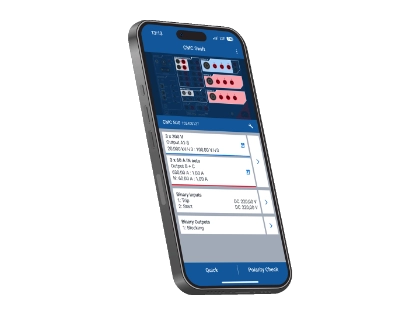
Operate your CMC test set flexibly in any setting
Enter values easily with optimized input modes
CMC Swift logs all events to support troubleshooting
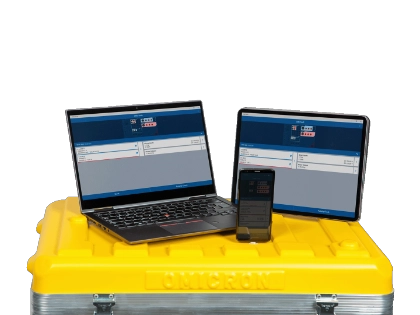
Use on your Android, iOS, and Windows devices
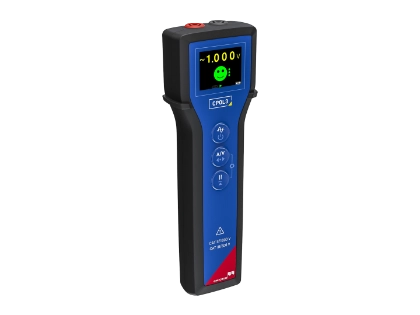
Efficient polarity checks when combined with the CPOL3
Flexible and Mobile Control for CMC Test Sets
The CMC Swift app for CMC test sets enables convenient mobile device operation. It delivers fast, precise analog voltage and current outputs and measures binary signals. The app supports wiring checks, pickup and trip tests, and optimized input modes for basic protection testing. Real-time event logging increases transparency and simplifies troubleshooting. The CMC Swift app supports multiple platforms and seamless CPOL3 integration for polarity checks. This enables versatile and efficient field testing in any environment.
Flexible. Fast. Smart.
The CMC Swift app gives you the freedom to operate your CMC test set wherever the job takes you. Work flexibly in any setting with intuitive input modes that let you enter test values quickly and easily. Watch live events in an intelligent event list for quick, reliable troubleshooting. Use your preferred Android, iOS, or Windows device to perform efficient polarity checks with the CPOL3–the result: greater mobility, faster workflows, and more efficient testing.
- More freedom of movement and comfort: Move freely and control your test set comfortably in any situation.
- Flexible input handling: Use multiple input modes and switch between primary, secondary, and per-unit values.
- Live event visibility: View all events in real time in an intelligent event list for efficient troubleshooting.
- User interface: Use the app on smartphones, tablets, and laptops with an interface that adapts to your device.
- Polarity and wiring checks: Perform checks and identify phases in three-phase systems with the CPOL3.
- Automatic updates: Stay up to date comfortably with direct updates via the app store.
Where This Product Is Used


Related Products
Insights


OMICRON Academy
Related Trainings
- Automated distance and differential protection testing with CMCClassroom TrainingSeats available
- 2 days
- Australia (Perth CBD)
- Test Universe, Test Universe Modules, Protection Testing Library (PTL), CMC Swift, ADMO with Insight
- English
- Automated Power System Protection TestingClassroom Training+12 dates availableSeats available
- 3 days
- Austria (Training Center Klaus), United Kingdom (Training Center Stafford)
- Test Universe, ADMO with Insight, Protection Testing Library (PTL), CMControl P, CMC Swift
- English
What are the system requirements for CMC Swift?
CMC Swift works on mobile devices running Android 10, iOS 15, and Windows 10 version 22H2 (build 19045) or higher.
Which test sets can I control with CMC Swift?
Which CMC firmware version do I need?
We generally recommend using the latest firmware version. Download the latest firmware version from our Customer Portal.
How can I connect my mobile device (Android and iOS) to my test set?
Plug the Wi-Fi USB adapter into your test set, activate your mobile device’s Wi-Fi, and connect to your CMC test set’s network. The default password is your test set’s serial number doubled. After you start the CMC Swift, tap "Choose test set" and select your device.
Need help deciding?